2009年6月19日

解決 Cannot convert type 'ASP.login_aspx' to 'System.Web.UI.WebControls.Login'

由於最近有些系統在搬遷
原本在舊 Server 上運作很順利的系統,一搬到新 Server 瞬間掛掉
出現的訊息還是沒看過的 source code,這到底是怎麼一回事呢?


坎尼開了系統上的 Login.aspx.cs 想找上圖裡錯誤訊息
卻發現根本沒這段 code,七月還沒到,怎麼阿飄自己先來啦?

把錯誤訊息丟上網才發現,原來是 partial class 惹的禍
.net 2.0 新增的 Login 控制項剛好 class name 也是叫 Login
所以兩個名字一樣的就要有一個去鄉公所改名啦

把 class name 及 aspx 的 inherits 改掉即可成功在 Server 上運作


但坎尼覺得還是很奇怪,怎麼舊的Server都沒這個問題呢?
明明兩台的環境都是 windows server 2003 sp2

後來發現原來是新機器的 .net framework 2.0 還沒裝 sp
裝上 .net framework 2.0 sp1
連程式都不用改!!! 問題解決!!!!


同樣的問題也會發生在命名為 Menu 的頁面
記得至少要把部署機器上的 .net framework 2.0 升級到 sp1

2009年6月8日

乘法矩陣第2發 - 用 javascript 做運算

上一篇用 excel vba 做矩陣運算
坎尼這兩天又用 javascript 的方式再修改了一下

先給個 demo 連結

從連結進入後,可以看到頁面上已經亂數產生了兩個矩陣
上面有一些矩陣的設定值及功能按鈕

數字範圍為程式要產生的亂數值範圍
若要自訂矩陣大小,可先填入左上角的矩陣大小
再點選建立自訂矩陣功能即可產生使用者設定的矩陣

若是產生的數字不喜歡
可直接點選 table 的格子做修改

點下計算答案即可算出前兩個矩陣的結果


整個程式結構和 vba 版本很像所以就不講了
唯一有變的就是計算結果的演算法,有興趣的人就自行查看原始碼囉

要對照答案是否正確,可以上 WIMS Online Matrix Multiplier

另外自訂矩陣經坎尼測試,大概 50 x 50 的計算都還沒問題
但如果設定太大把瀏覽器資源吃光光坎尼可不負責
(坎尼試過 450 x 450 畫面跑了好久才出來)

2009年6月3日

Excel VBA 作矩陣相乘運算

雖然到最後你還是沒留下你的名字...


今天就來介紹一下,如何用程式撰寫多維矩陣乘法運算

首先要了解一下矩陣乘法的計算方式
  • (m1 x n1) * (m2 x n2) 結果會是 (m1 x n2)的矩陣
  • 上例中的 n1 = m2
  • 矩陣乘法位置互換結果就會不同
(大家可以直接點上方的 wiki 連結,裡面有更詳盡的介紹)

接著就是回到 Excel 啦
首先在 Sheet 上佈置一個 CommandButton
(沒看到的話,請到工具列→點右鍵→把設計工具箱打開)
然後在 Sheet 的儲存格上隨意填入一些值,等等要來當作矩陣的輸入值

接著在 Button 上點兩下進入 VBA 編輯畫面 (記得要在設計模式)
然後就是進入 VBA 的程式撰寫啦 >w<
  • 首先用 Application.InputBox 方法讓使用者選取畫面上的儲存格,Type=8表示回傳值為 Range 物件
  • 取得兩個 Range 物件的 Row Count 及 Column Count (切丁備用)
  • 依前面的規則判斷是否可運算 (範例裡的 M1C 要等於 M2R)
  • 建立兩個陣列物件,並將長度指定為第一個矩陣的 Column Count (或是第二個矩陣的 Row Count,它們兩個應該要相同)
到目前為止應該還算ok吧???
接著就是如何去計算結果矩陣裡的值
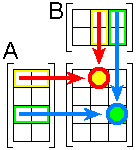
坎尼是用 wiki 裡提到的 這個方法

AB (結果矩陣) 中的 (1,2) 這格就是用 A 的第1列乘上 B 的第2欄

用下面這個動畫圖應該可以了解 (圖片來源:Scalar and Matrix Multiplication


所以再回到程式裡
坎尼用了兩個 For 迴圈將目標裡的值一格一格算出來
先是取得第一個矩陣的第一列(一維陣列),再去乘上第二個矩陣裡的一行(一維陣列)
可以得到結果矩陣第一列所有的值 (傳入 CellValue 裡計算)

接著再抓第一個矩陣的第二列去乘上第二個矩陣裡的每一行....以此類推

CellValue 是坎尼用來計算結果值的 Function
傳入兩個陣列即會把對應的 index 值相乘,最後再加總回傳 (回顧一下公式)


再來就是執行結果,先把模式改為執行模式 (點一下設計工具箱的三角板)
點「選取陣列」的按鈕,就會跳出選擇矩陣的方塊,此時可以在 Excel 儲存格上選取

矩陣1選完會再要求選擇矩陣2
記得,(m1 x n1) * (m2 x n2) 裡的 n1 = m2

選完之後,若是可以計算的兩個矩陣,會出現提示

Sheet2 裡果然有值

但是答案是否正確呢?
大家可以上 WIMS Online Matrix Multiplier 把相同的矩陣丟進去算算看
或是拿起筆來自己算吧 XDDD

由於中間省略了很多步驟,可能沒寫過 VBA 的人不知道坎尼在幹嘛吧 XD
坎尼今天上網有看到一個不錯的 Excel VBA 教學站 威廉博客
有興趣想學 Excel VBA 的人就過去看看吧 :D

矩陣這東西離坎尼好久遠了,好在有前人種好的大樹 - wiki
K了兩個晚上總算是有點成果
但是否還有更好的程式邏輯就請路過的大師們指教啦 哈哈哈
範例程式下載 要使用範例請先允許巨集執行

另外就是歡迎讀者發問
不過請留下可以連絡的方式,有時坎尼看不懂問題會睡不著覺啊啊啊~
另外要交作業的請不要問坎尼,這可是要收錢的,很貴的

2009年5月23日

輕鬆使用MS Chart Control - 樣式設定篇

這次來簡單的說明一下 Chart Control 的一些樣式設定吧

首先,先把焦點放到 Chart 屬性的 Appearance 分類
要修改Chart上的資料顯示顏色,可直接修改 Palette 屬性,下拉會有預設的多種樣式
若是想要自己設定顏色,就到 PaletteCustomColors 裡設定

不過坎尼這邊一直有個疑問,在 PaletteCustomColors 的說明裡

提到這個屬性比上面的 Palette 的屬性值還要優先
但為何兩個屬性同時設定時,出現的顏色卻是以 Palette 優先呢? (如下圖)

坎尼開了 vs2010 的 Chart Control 出來看,也是一樣
所以說明是一回事,顯示出來又是另一回事....
Anyway,大家有空再自行測試看看 (說不定是坎尼搞錯了?)

另外還有一種方法可以改變資料顯示的顏色
就是直接到 Series 裡修改,且目前實驗發現,這邊修改的 Style 優先權最高
下面可以看到坎尼加了個 Series2,並將顏色改為漸層

顏色為自訂的漸層色

最後來補充一下,上面的圖都有出現的外框
先打開 Chart 屬性裡的 BorderSkin
首先要選定 SkinStyle,接著再調整要展示的樣式

前幾張實際畫面的 Border Style 如下
(這裡為了展示,所以幾乎所有樣式都選了)


最後是 範例檔下載
範例展示畫面


其實這篇所講的樣式還只是冰山一角
未來有機會會再介紹其他樣式設定

2009年5月21日

輕鬆使用MS Chart Control - 資料繫結篇

之前坎尼有寫一篇 Chart Control 製作學生成績表
現在就來教一下如何使用 Chart Control 吧!
(安裝部分就跳過不講了,請自行參照上面的連結)

I.利用 SqlDataSource 控制項
首先,在頁面上拉進一個 Chart SqlDataSource

將 Chart1 的 DataSourceID 屬性指定為剛剛拉進來的 SqlDataSource

接著選擇 Chart1 屬性裡的 Series 集合

選 Series1後,設定 XValueMember YValueMembers
這邊由於有設定 SqlDataSource,所以兩個屬性都可以由下拉的方式選擇
(注意:X軸為類別,Y軸為數值

接著就是放到網頁上預覽啦


II.利用 ObjectDataSource 控制項
首先,在後端建立一個取得資料的方法,如下圖的 GetMyTable()
這邊坎尼先用人工的方式建立資料,並可回傳給 ObjectDataSource 使用

前端加入一個 ObjectDataSource
並將 ID 指定給 Chart1 的 DataSourceID 屬性
XValueMember 及 YValueMembers 的設定方式和前面相同

OK!!!大功告成!! (最後會有畫面

III.利用程式控制
其實這個方法已經在上次講的 範例 裡有提到過了
  • 先取得資料
  • 把資料設定給 Chart1.DataSource
  • Chart1.DataBind(); //打完收功

這邊要注意的是 ValueMember 已在前端設定,所以可以直接 DataBind()
否則要加入下圖的設定


範例檔下載 (只有 ObjectDataSource 及 程式控制部分,SqlDataSource請自行練習)

範例檔的執行畫面 (就長度來看,工程師的薪水似乎比較高?)


資料繫結給 Chart 控制項
最主要的就是 X 及 Y 的繫結欄位,且Y一定要數值型
另外目前都還只用一個 Series,或許未來會用多個 Series 來示範?

下次的主題是樣式設定,敬請期待 :D

2009年5月19日

visual studio 2010 beta 快照

距離上次提出 vs2010 CTP 版本至今大約也過了半年
總算是在本星期三可下載beta版本 下載點 (聽說星期三才有用)
這邊坎尼抓了幾張圖和大家分享一下

安裝畫面可以參考祭司的 VS 2010安裝畫面預覽
安裝完就是漂亮的 vs2010 start page
這次將整個 visual studio 利用 WPF 重新改寫
畫面真是愈來愈亮麗啦 (這裡很抱歉沒抓圖 Orz

首先是 new project 的畫面

上面一樣有 multi-target 選項,當然支援到 .NET Framework 4.0 beta
另外還有 2.0、3.0、3.5 可供使用者選擇
左方的專案樣版也提供了 SharePoint Silverlight 開發樣版
但 MVC 這次則不包含在vs2010 beta 版本裡,而且聽說裝了還會出問題
(若還是想裝MVC的人可以參考這篇

另外這次在UI上方多了個 Sort 下拉選項,可以將專案樣版依名稱做排序

接著坎尼開了個 Web Application 想比較一下差異性
下圖左方為 vs 2010 的預設 Toolbox,右方則為 vs 2008
以全部收合的大類來看是完全一樣的 (坎尼另外加進來的 item 不算

standard 一打開坎尼就發現多了 DynamicHyperLink 的 Control

Data工具箱打開則是多了 MS Chart Control
但由於坎尼早就裝了,所以這裡的工具都一樣

就在坎尼逐一對照之下,發現其他工具箱裡的控制項完全一樣 (除了版本號改為4.0
所以此次在控制項方面的改變不大
這次外功目前看來尚無強力新招,但內力據坎尼看到的倒是增加了不少
如加強 Ajax Library、Session State 改善等 (詳情請參照 這裡

最後提一個坎尼從CTP就十分尬意的功能:code snippets of javascript
下圖是在打完 function 後,按下 tab 鍵跳出的畫面

當然,for迴圈等基本語法也有支援

以後寫程式的速度又可加快不少

有興趣的人別忘了星期三 (應該是美國時間) 上網下載 vs 2010 beta1喔 :)

2009年5月9日

New World Community Grid Project – Influenza Antiviral Drug Search

距離上次 World Community Grid 啟動的新專案 – Help Fight Childhood Cancer 不久,前幾天收到 World Community Grid 寄來的信,最近開始了一個新的 Research Project
- Influenza Antiviral Drug Search,顧名思義,就是要研發對抗流感的藥物,主要針對那些已經對一般藥物產生抗藥性的強大流感病毒。

如果你不想讓你的 CPU 繼續吃閒飯,那麼可以藉由這個機會加入這個人類對抗病毒的大戰!!

Mail 的內容如下:

Title: World Community Grid - You Can Help Fight Influenza!
World Community Grid has started a new research project that will use your donated computer time to find new drugs that can stop the spread of an influenza infection in an individual. The research will specifically address the influenza strains that have become drug resistant, as well as new strains that are appearing. Your computer will help identify the chemical compounds that are the best candidates. This will accelerate the efforts to develop treatments that would be useful in managing seasonal influenza outbreaks and future influenza epidemics.
If you are currently contributing and want to check to see if you are contributing to this project, click here. If you are no longer contributing but would like to contribute to this project, please click here.

For more information about the Influenza Antiviral Drug Search project or other projects running on World Community Grid, please click here.

Influenza Antiviral Drug Search 計畫首頁的說明如下:

Project Status and Findings: 
If you have comments or questions about this project, please visit the Influenza Antiviral Drug Search forum. For specific questions about the project, please go to the Influenza Antiviral Drug Search FAQs.

Mission
The mission of the Influenza Antiviral Drug Search project is to find new drugs that can stop the spread of an influenza infection in the body. The research will specifically address the influenza strains that have become drug resistant as well as new strains that are appearing. Identifying the chemical compounds that are the best candidates will accelerate the efforts to develop treatments that would be useful in managing seasonal influenza outbreaks, and future influenza epidemics and even pandemics.

Significance
Hundreds of thousands of people around the world die each year as a result of influenza infections. If a particularly virulent strain emerges that is readily transmitted among humans, a pandemic can potentially kill millions of people. The influenza virus mutates rapidly and therefore new varieties of influenza appear each year. Influenza vaccines are designed to anticipate the strains likely to be prevalent for the next flu season but can often miss newly evolved varieties. While drugs such as oseltamivir (commercial name Tamiflu) and zanamivir (commercial name Relenza) help keep influenza from spreading in the body, they do not work for all types of influenza and new drug resistant forms of influenza evolve and cannot be treated with these drugs. When drug resistant strains emerge, manufacturers designing vaccines may not be able to respond quickly enough to prevent a large outbreak of the disease. This project will search for promising new drug leads that stop the replication of the influenza viruses within the body, potentially helping patients who are not immune to a particular form of influenza. The discovery of both broad-spectrum and specific antiviral drugs is expected to significantly improve global health.

Approach
One promising approach to combat these viruses and prevent them from causing disease is to develop new drugs that inhibit neuraminidase (N1, N2, etc), NS1 protein, hemagglutinin, and possibly other targets that influenza needs to spread in the body. Using the known chemical structures of these target molecules, the project will perform virtual chemistry experiments and determine which of millions of known compounds attach to these target molecules in a manner that can disable or inhibit them, thus potentially keeping the influenza virus from spreading in the body. These experiments are performed using a program called AutoDock, from the Scripps Research Institute. This software is used for several other projects on World Community Grid. These include FightAIDS@Home, Discovering Dengue Drugs - Together, and Help Fight Childhood Cancer projects. Once drug candidates are identified using World Community Grid, then additional laboratory work, testing and ultimately drug trials will be required. This will likely not lead to any immediate treatments for influenza during the current H1N1 outbreak. However, influenza viruses cause recurrent seasonal disease outbreaks and have the potential for evolving into dangerous forms. Thus, proceeding on this project at this time will give us a better chance to be prepared for more serious outbreaks in the future.
In an effort to spread the words about WCG, I will include a link to my last post about WCG – here it is: Help Fight Childhood Cancer

Google Spreadsheet 裡用規則運算式

最近因為工作關係,遇到要用 Google Form 及 Google Sheet 所以研究了 Google Sheet 裡的一些 function 怎麼用 首先,分享一下如何在 Google Sheet 裡用規則運算 :D